Imagine a world where robots can feel — where machines can respond to touch, detect temperature, and sense humidity just like we do. Thanks to groundbreaking research from the University of Colorado Boulder, that future is getting closer than ever.
A team of brilliant minds, led by Assistant Professor Jianliang Xiao from the Department of Mechanical Engineering, has developed a revolutionary new material known as electronic skin, or e-skin.
This thin, flexible, and transparent layer mimics the sensory abilities of human skin — and it's designed to wrap around robots.
What Exactly Is Electronic Skin?
E-skin is made from a web of tiny sensors that connect to a computer, which translates touch-based data — like pressure or temperature — into digital signals a robot can understand. Think of it as giving robots their very own nervous system.
Unlike other versions of artificial skin being developed around the world, the University of Colorado Boulder’s e-skin stands out. It’s not only flexible and stretchable — it’s also transparent, making it easy to integrate with existing robotic systems without obstructing their appearance or functionality.
Why Does It Matter?
This breakthrough isn't just about making robots cooler — it’s about changing the game across multiple industries:
Healthcare: Imagine robots that can monitor patients without any invasive procedures. With e-skin, medical robots could measure vital signs like heart rate and blood pressure just through contact.
Manufacturing: E-skin could allow robots to detect defects in products by touch, enhancing quality control and reducing waste.
Prosthetics & Human-Machine Interfaces: The ability to feel could make prosthetic limbs more lifelike. It could also enable more intuitive interactions between humans and machines, like robots that can react to a gentle tap or a firm grip.
A Step Toward More Human-Like Robots
In an interview with CNN, Professor Xiao emphasized the adaptability of the technology, saying, “Our e-skin technology can be easily integrated with existing robotic systems, making it a promising tool for the development of advanced robotics and artificial intelligence.”
With the global robotics market expected to grow from $39.7 billion in 2021 to $176.8 billion by 2028, (according to Allied Market Research), e-skin could play a pivotal role in unlocking that growth.
The Road Ahead: Challenges and Possibilities
Of course, no innovation is without hurdles. Two major challenges currently stand in the way of e-skin's widespread use:
Durability: Electronic Skin sensors can be delicate. Making them tougher without losing sensitivity is a top priority for researchers.
Cost: As with many cutting-edge technologies, the current production cost of e-skin is high. — something that needs to change for mass adoption.
Despite these challenges, the progress is inspiring. As production methods improve and costs come down, we could soon see e-skin-equipped robots not just in labs, but in hospitals, factories, and even our homes.
The Bigger Picture: Human-Machine Synergy
Ultimately, e-skin is more than just a technological achievement. — it’s a step toward a future where machines interact with the world in human-like ways. This raises fascinating possibilities and important questions about how we’ll live and work alongside these enhanced machines.
Will robots become our nurses, our coworkers, or even our caregivers? Could they replace humans in critical roles, or will they simply extend our capabilities? As we push forward, these are questions we’ll need to explore carefully.
The University of Colorado Boulder's development of electronic skin is not just a scientific milestone. — it’s a glimpse into the next era of robotics and artificial intelligence. As researchers continue to innovate and address the challenges of durability and cost, we move closer to a world where robots truly feel the world around them.
Stay tuned. The future of touch is here — and it’s electric.
There’s no one-fits-all answer to this question. The number of views your YouTube videos get will depend on various factors such as the topic, production value, length, and promotion.
But by upping your views, you can also increase your chances of being discovered by new viewers, which is essential for growing your channel and making money on YouTube.
Having said that, you can do a few things to increase your chances of getting more views. Here are some actionable tips:
How can you Increase Views on your YouTube Channel?
1. Write Attention-Grabbing Titles to Increase Views
No, we’re not encouraging you to write clickbait. Instead, focus on creating titles that accurately reflect the content of your video while being creative and interesting enough to make people want to click.
Your title should give viewers a general idea of the video. At the same time, it should be short, sweet, and to the point.
Make sure to include relevant keywords that people might search for on YouTube. It will help your video come up on search results.
Dr. Mike does a great job of this. His video titles are to the point and self-explanatory.
Here’s another creator that gets it right. Instead of just titling the video ‘’Workout for a 6 Pack’’, he makes it descriptive and inviting enough for people to click.
2. Add a Custom Thumbnail
Adding a custom thumbnail can help increase your click-through rate and, as a result, get more views.
Thumbnails are little images that give viewers a preview of your video. By default, YouTube generates random thumbnails for you to choose from. But we recommend you upload a custom thumbnail to make your video look more professional and trustworthy.
When creating a thumbnail, ensure it’s high quality and relevant to the video. Most importantly, it should be enticing enough to make viewers want to click. Take a page out of Mr. Beast’s book.
That thumbnail is descriptive of the video title. Plus, it’s on-brand for the creator.
3. Create Playlists
YouTube playlists are a great way to keep your viewers engaged with your channel while allowing them to explore new content. You can create a playlist for almost anything, whether a group of your favorite songs, a compilation of videos from a specific theme, or a series of how-to guides.
4. Use End Screens to Increase Views
Another way to get more views on your YouTube videos is to add an End Screen. An End Screen is a YouTube feature that allows you to promote other content on your channel and external websites in the last few seconds of your video.
You can use an End Screen to promote up to four videos, playlists, or channels on YouTube or link to an approved website. You can also encourage viewers to subscribe to your channel and link to your merchandise.
Firstly, it’s essential to verify your account.
Is your youtube channel verified to Increase Views?
Once you’ve done that, you’ll see the option to add an End Screen when you create a new video or edit an existing one. Here’s an example of how the Jimmy Fallon Show uses this feature.
5. Ask Your Audience
There’s no better way to get more views on your YouTube videos than to ask your audience what they want to watch. For example, if you have a tech channel, you can ask your audience what devices or software they want you to review.
If you have a cooking channel, you can ask your audience for recipe ideas or fun YouTube challenges. The key is to be responsive to your audience’s suggestions and give them the content they want.
You can use YouTube’s Community tab to ask your audience questions or ask them in the video itself. Either way, ensure you’re regularly asking your audience what they want to see and then delivering their desired content.
You can also use social media for this. For example, put up a question tab on your Instagram story and ask your followers what type of videos they want to see. You can also use Twitter or Facebook polls.
On the one hand, your audience’s feedback helps you set SMART digital marketing goals. On the other hand, it increases views because the audience is getting what they asked for.
6. Enable Embedding to Increase Views
When you enable embedding on your YouTube videos, your viewers can choose to embed your videos on other websites. It lets you increase the reach of your videos and helps promote your YouTube channel.
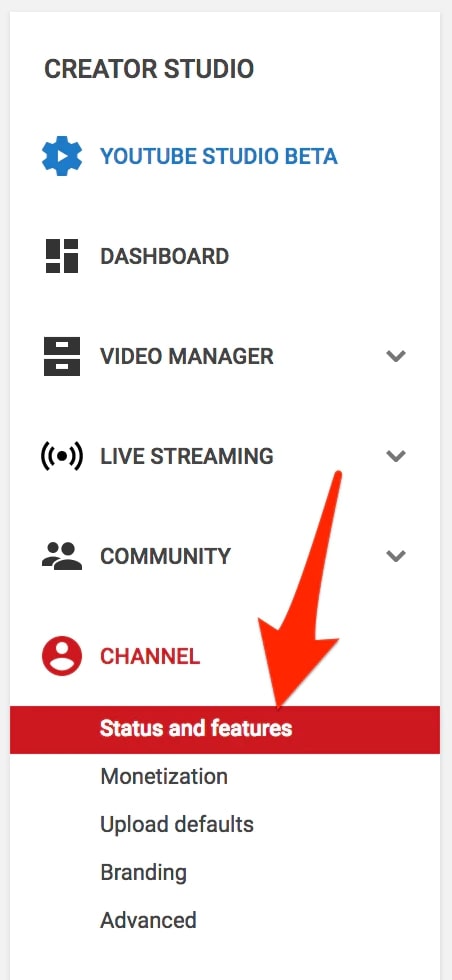
Here’s how to enable embedding:
In Advanced Setting, go to Distribution options and tick Allow Embedding.
If you enable embedding, people who like your videos can post them on their websites, which can help you get more views. Suppose you review gadgets on your YouTube channel.
If you enable embedding, a technology blog might embed one of your gadget reviews on their website. It could help you attract new viewers who might be interested in your channel.
7. Tap Into Influencer Marketing to Increase Views
Earth Web data revealed there are 3.2 to 37.8 million influencers worldwide, spread across YouTube, TikTok, and Instagram. That explains the increasing trend of influencer marketing, especially on social media.
You can create an influencer strategy to get more views on your YouTube videos. Here’s how to do it.
Suppose you’re a lifestyle brand selling fashion and home decor products. You want your YouTube channel to come to life.
Your first step is to identify the right influencers. Let’s say you’ve decided to work with three influencers with 50,000 and 100,000 followers. Or, you can work with micro-influencers to reach the niche market.
Your next step is to contact the influencers and pitch your idea. You can offer to pay them or give some other compensation, such as free products or services.
These influencers can post about you on their social media channels, such as Instagram and TikTok. For example, they can link to your affiliate videos in their Instagram stories.
In this way, their followers will become aware of your channel and watch your videos. You can also ask the influencers to mention you in their YouTube videos.
The purpose of influencer marketing is to reach a larger audience. So it’s a win-win situation for both you and the influencers.
Shein, Fashion Nova, and Princess Polly are some of the many brands working with social media fashion and lifestyle influencers.
8. Follow the Best YouTube SEO Practices to Increase Views
You’ll only get more views if you appear at the top of the search results. To accomplish that, you need to step up your YouTube SEO game.
Here are a few good practices:
Keywords in Titles and Descriptions: When people come to YouTube, they enter keywords, or phrases, to find the videos they’re looking for. You want your video to show up when those keywords are entered. So put them in your title and description. Keywordtool.io & Tube Buddy is an excellent tools to help you find the right keywords for your videos.
Annotations: You can add notes to your videos that pop up at certain times. These can help guide viewers to take specific actions, like subscribing to your channel or checking out your website.
Thumbnails: The thumbnail is the first thing people see when they come across your video in the search results. So make sure it’s something eye-catching that accurately represents what the video is about.
Tags: Tags are like keywords for your videos. They help YouTube understand what your video is about, and they can also help it show up in the search results.
9. Partner With Other YouTubers
Guest appearances, mash-ups, and interviews with other creators are great ways to get more views and subscribers on YouTube. Collaborating with other YouTubers can help you tap into new audiences and gain exposure for your channel.
For example, if you make commentary videos about pop culture, consider reaching out to a YouTuber who creates similar content and see if they’d be interested in doing a crossover video with you. You can also do a guest appearance on another channel or have another YouTuber interview you for their show.
For instance, Brand Mondo, a hair stylist, and Dr. Mike did a crossover. Dr. Mike posted the following video on his channel while Mondo helped him choose outfits.
Likewise, Mondo also posted a video on his channel where Dr. Mike explains how to cure dry scalp and dandruff. As evident, the video content was relevant to each creator’s specific audience.
When doing YouTube partnerships and crossovers with other creators, you must ensure you create content relevant to your audience and branded for your channel.
10. Host a Giveaway
What could be better than getting free stuff? Hosting a giveaway can bring in more viewers for your YouTube videos. It’s a great way to engage with your audience and get them involved in your content.
Give away something that resonates with your brand and brings you closer to your audience. If you are a vlogger who consistently gets questions on the type of camera that you use or how to set your lighting up, consider giving away a content creator kit with your best goodies.
You can keep rules as simple as liking a video, leaving a comment, and subscribing to your channel. Alternatively, you can make the entry requirements exciting by coming up with creative challenges for your viewers to complete.
Make sure to promote your giveaway across social media platforms to get as many people involved as possible. You can also partner with other YouTubers who have a similar audience to yours to help reach more people.
11. Optimize Your Channel
Optimizing your YouTube channel is instrumental to its success. You can’t have incomplete information or a poor design and expect to draw in viewers and keep them engaged. Here are some tips for optimizing your channel:
If you’re a company or brand, make sure your profile picture is your logo.
Set a relevant banner image that shows your latest campaign, product, or event. It should be a minimum of 2560 x 1440 pixels. Even non-designers can do wonders with the tools available today.
Have a description that’s keyword rich and tells viewers what they can expect from your channel. YouTube has a 1000-character limit, so use it wisely. Incorporate keywords and keep the description to the point.
Add links to your social media channels and website.
The key is filling in your About section, so potential viewers know what to expect from your channel. Regular updates and a consistent posting schedule are essential to keeping viewers engaged.
5-Minute Crafts, one of the most subscribed channels on YouTube, keeps it precise and simple. They’ve also added a link to their shop so that people know where to buy merchandise.
12. Choose the Right Time to Publish
Fortunately, YouTube now gives you a “When your viewers are on YouTube” report in your Analytics that tells you when your viewers are watching YouTube.
With this information, you know when is the best time to publish your video. Make sure you publish videos when your viewers are most active to maximize your chances of being seen.
13. Transcribe Your YouTube Videos
You might be losing out on view because of language constraints or disabilities. The best solution is to transcribe your videos. You can use a tool like oTranscribe, a free and open-source web app, to transcribe your videos.
Or, you can hire transcription professionals from sites like Fiverr and Upwork for increased accuracy.
Final Words
As evident, there are several ways to increase views on your YouTube channel. You should also promote your content on other social media platforms. Additionally, you can work with influencers and create playlists to grow your online presence. Plus, engage your audience, encourage them to subscribe to your channel, partner with other content creators, and create SEO-friendly titles and tags.
How can you Increase Views on your YouTube Channel?
There’s no one-fits-all answer to this question. The number of views your YouTube videos get will depend on various factors such as the topic, production value, length, and promotion.
But by upping your views, you can also increase your chances of being discovered by new viewers, which is essential for growing your channel and making money on YouTube.
Having said that, you can do a few things to increase your chances of getting more views. Here are some actionable tips:
To increase your YouTube video views legitimately, first and foremost, you’ll have to brush up on your YouTube SEO practices. This means:
Knowing which keywords to use. Keywords are people’s search phrases and queries. If you want your video to be discoverable, you’ll have to use the right keywords. Opt for long-tail (meaning, more descriptive and accurate) keywords, since they are easier to rank for. The broader your keyword is, the harder it is going to be to rank for it. For example, instead of trying to rank for “cute dogs”, try to rank for “cute dogs doing silly things”.
Optimizing Your Video Titles. YouTube cuts video titles off at 66 characters, so make sure your titles are shorter than that and are concise. If your audience can see what your video will be about, they are more likely to click on it.
Optimize Your Thumbnails. This is very, very important. Make sure your thumbnails are clear and appealing. Also, your thumbnails should complement your video title - so make sure they go together well.
Optimize Your Video Descriptions. Your video description is prime real estate for using keywords. Make sure you insert your keywords at the beginning of the description and up to 3 other times throughout and write for people. Give a description of your video using proper language and writing rules - don’t just type out your keywords over and over again because that’s not going to fly with YouTube’s algorithm.
Create Playlists. YouTube is likely to recommend other videos from your playlists, and curating your content will make viewing it a much more pleasant experience for your viewers.
Also, there are many ways to grow a YouTube channel faster than only in some months.
• By investing some money
• Without investing any money
By paid methods, you can run ads on Facebook, Instagram, and Google AdWords— these will automatically boost your ad by increasing the views, and if the audience like your content then they will surely subscribe to your channel. You should run ads on your best video which you think that this video can grow more in the future and you can add your success stories on ads you can also promote your channel by giving money to other successful YouTubers to promote your channel And also there are other paid methods you can apply to grow.
But if you don't want to invest any money to Increase Views, in that case, ????????
• Let's be more focussed on every social media platform like Linkedin, Facebook, Instagram, etc to grow your followers or network there. Put stories, posts, etc there related to your content daily and consistently.
• And upload more and more videos on daily basis.
• Focus on your content to Increase Views— how good it is. Try to improve it. For example, if your channel is based on teaching then watch other top YouTubers' videos to improve your videos.
• Focus on your thumbnail to Increase Views, it should be very attractive and with some hidden concept in it that people should click on it. Try to improve your video editing because good and attractive editing can boost your channel's views very fast. Make shorts as much as possible Because it can increase your subscribers. YouTube virals the shorts very fast, you just focus on your content.
JUST REMEMBER THIS …You Can Definitely Do it!!!!! Don't GIVE UP By Uploading Only some Videos and then Quit. Then you cannot grow there.
The next thing you’ll have to do is be consistent with your uploading schedule and promote your videos on other social media networks and platforms. This will keep your followers on all social media outlets notified whenever you upload new content and they’ll be sure to watch it.
Final Words
As evident, there are several ways to increase views on your YouTube channel. You should also promote your content on other social media platforms. Additionally, you can work with influencers and create playlists to grow your online presence. Plus, engage your audience, encourage them to subscribe to your channel, partner with other content creators, and create SEO-friendly titles and tags.
Read More:
Li-fi and Wi-fi are not the same things. Many people make the same mistake. Internet that is available through Light is called Li-fi. In today's episode we will discuss what is Li-fi, history of Li-fi, how it works, benefits of Li-fi, when will Li-fi come, and Wi-fi Vs Li-fi. Make our writing worthwhile from the end.
Li-fi's full-form Light-Fidelity. Li-Fi is a wireless optical networking technology that transmits data through lights. It is supposed to be 100 times faster than Wi-Fi. But still, the actual speed is not sure. Dramas, songs, etc will be downloaded in a blink of an eye on Li-Fi.
We know that we get an internet connection through light. The Wi-Fi we use today is transmitted through optical fiberglass, reducing the speed by about 40%. On the other hand, Li-fi can be used through household lamps. So wi-fi is considered to be nothing in front of the speed of li-fi.
History of LiFi Technology:
Professor Harald Hasch of Edinburgh University is the inventor of Li-fi. He first unveiled and introduced Li-Fi in 2011. He showed everyone how to communicate with a light. After the test results of Li-fi vs Wi-fi, li-fi was found to be much faster than wi-fi.
He then joined a company to further develop Li-Fi. And that company is called PURELIFI. Although many companies are currently working on li-fi.
How does LiFi work?
We first give an example with TV and remote. Then you will understand. When we give a signal to the TV with the remote, the channel of the TV changes. But why is this? Let's find out.
We have seen that there is a light attached to the front of the TV remote. Also called an infrared bulb. Then, when you press a button on the remote, the specific signal on the remote lights up. Seeing the light from the remote, the sensor on the front of the TV understands it and works accordingly.
Suppose, to change the TV channel, if the light on the remote blinks twice, the channel changes. That is, whenever the remote is pressed, different signals are sent to the TV. And the TV understands the remote signal because the TV is pre-programmed.
Our li-fi technology is very much like that. But our TV remote has only one bulb installed. But Li-Fi will have lots of bulbs installed so that data transfer is faster and many people can use it simultaneously. Now let's come to work.
First, the internet will come to your router from the li-fi Net server. Then the data will be transferred from the router to the light or bulb and you will get the service from there.
If I want to say in the language of the book, then I will say that the light from the LED bulb captures data at frequencies. And the data is exchanged, through LiFi-supported devices. Then a PhotoSensitive Detector converts the light frequencies into signals and converts them into electronic data systems. And that's how Li-Fi works.
Although the technology is only being used in industrial applications, it will soon make its way into smart homes. It is predicted that future home and building automation will continue to rely on LiFi to be fast and secure.
From what we have known so far, we may have known about the benefits of fast speed. Now let's know about some more benefits.
1. The first advantage we already know is its great speed. On Li-Fi you can get speeds up to around 100 GBPS. Also, Li-fi has 10,000 times more frequency than Wi-fi.
2. Since Li-fi has a higher frequency, many people can use it simultaneously. But when the number of users on Wi-fi is high, the net becomes slow. So Li-Fi will be the best technology for network sharing.
3. Li-fi connects through room lights, so only you get that data when your room lights are on. No one outside the house can use the Li-fi you bought with your money. And no one will know that you are running Li-Fi. On the other hand, if you run wifi, it goes out through the wall and others connect if you know the password. As a result wifi speed decreases.
4. Since Li-fi runs on light, you can direct it towards you. As a result, there will be no signal loss and the speed of data exchange will increase. On the other hand, the Wi-Fi signal spreads around and causes a lot of loss. And you don't get real speed either. So Li-Fi will be the latest benchmark of internet speed.
5. There are many places where radio or wireless signals are prohibited. There also you this technology
can use Because it doesn't need wireless to use it. For example – A wireless signal or network is turned off in various factories. Because many times there is a danger of accident from the net signal. Again, the network is not available on the plane. So you can use LiFi even there if you want.
And the most interesting thing is that you can use Li-Fi even under deep clear water. Because we know that normal wireless signals don't work underwater, but light signals do.
When you use Li-Fi, you will see many more benefits. Because using it gives a real idea about a thing. Let's demystify some Li-Fi myths. Maybe you also believe in this rumor. Let's put the rumors to rest.
6. Another big advantage of LiFi is that the use of solar allows LiFi connections to happen almost instantaneously because light travels at such a high speed. This leads to faster transmission of knowledge and faster internet connections – about 100 times faster than speeds achievable by WiFi.
1. Many of us know that LiFi will be 100 times faster than WiFi. But to me, it seems like a rumor. Because of the wi-fi we use, the latest technology can provide speeds up to 700 GBPS. Such speeds have not yet been found in LiFe's experiments. So LiFi will never be 100 times faster than Wi-Fi. Maybe through research, it can be 2x faster shortly.
2. Movies or large files will download in 1/2 second on li-fi, it's not that realistic. because We currently hear about 700 Gbps internet speed of wifi. But service providers doubt whether we can get a maximum of 100 Mbps from our line. And Li-Fi how do you expect so much speed? Maybe this speed will be officially applied for some big work.
Where is Li-Fi technology used?
Li-Fi technology is widely used in various applications such as healthcare, education, retail, aviation, exhibition industry, etc. . Healthcare is one of the primary application areas within the global Li-Fi market. Hospitals have always received technology in the form of wired connections.
Mar 6, 2019. Indonesia is among the first countries to power LiFi in a primary education center. Eindhoven, The Netherlands - Global lighting leader Signify (Euronext: LIGHT) has announced that it is working with around 30 customers in Europe, North America, and Asia to launch its commercial LiFi system.
Is Li-Fi technology harmful?
In contrast, LiFi transmits data through light waves in the spectrum, so is completely free from harmful radio-frequency radiations. Similarly, LiFi technology is often used in environments where WiFi is considered a threat.
Can LiFi be hacked?
Li-Fi uses visible light. ... Li-Fi works on existing protocols and unlike Wi-Fi does not require routers or hotspots. It can transmit data at much higher speeds than conventional Wi-Fi systems. Furthermore, since light cannot pass through walls, it is thought that Li-Fi signals cannot be easily hacked.
Can LiFi replace WiFi?
In line with WirelessSquare, Leaf-E, the use of solar energy to provide a wireless Internet connection, could become the most common source of communication in buildings within the next 10 years. Basically, it will be a game-changer, using LED lights to create WiFi.
What is the cost of LiFi?
The lamp costs around $841 and comes with a dongle. Only a single person can use the lamp at a time (multiple user support is due later this year), so you can't buy extra dongles.
When will Li-Fi technology come?
Already, various big IT organizations have started working using LiFi. Also to use Li-Fi you need to buy Li-Fi supported mobile. Renowned mobile manufacturing companies are working towards making mobiles Li-Fi supported.
As some companies continue to work with Li-Fi technology, it is assumed that LiFi will be used in 2022. No word on pricing.
Last word: You don't have to worry about Li-fi. Because our phone is not Li-Fi supported. If anyone buys a Li-Fi-supported phone, then come and tell the speed in the comment box, Inshallah.
Thank you, Follow Us on Facebook & See our videos on YouTube
In today’s age of information technology, mobile hacking has become a common threat. Smartphones store a lot of personal information, from contacts to bank details, making them a top target for hackers. Here’s how to identify if your phone is compromised and what steps you can take to stay safe.
Signs Your Phone Might Be Hacked
Unexpected behavior: Your phone turns on or off by itself, or apps open without your permission. This may indicate unauthorized access.
Battery drains quickly: If your phone’s battery suddenly doesn’t last as long as it used to, even though it’s new, a hacker could be running apps in the background.
Overheating: Phones naturally get warm during heavy use, but if it heats up while idle, it may be processing tasks for a hacker remotely.
Camera or volume issues: If your camera turns on or volume changes on its own, it could be a sign of tampering.
In such cases, it’s best to consult a technician to rule out hardware problems and check for malware.
Common Reasons for Hacking and Phone Vulnerability
Public Wi-Fi: Using unsecured Wi-Fi networks can allow hackers to access your device.
Suspicious links: Avoid clicking unknown links in emails, messages, or social media—they may contain viruses.
Auto-login in browsers: Avoid saving passwords automatically, as hackers can steal them if your phone is compromised.
Third-party apps: Download apps only from official stores like Google Play. Apps from unknown sources may contain malware.
Prevent Phone Hanging and Performance Issues
Google Play Auto Updates: Disable automatic updates to prevent your phone from being overloaded with simultaneous downloads. Update apps manually instead.
Check storage space: Ensure your phone has enough memory before installing new apps. Lack of space can cause performance issues.
Disable auto-download in apps: Social media apps often download messages, photos, and videos automatically, putting stress on your phone. Turn off auto-downloads.
Delete unnecessary folders: Some apps create auto-generated folders. Remove them to free up space.
Optimize Developer Options: In Settings → About Phone → Tap Build Number 7 times → Developer Options:
Set Window Animation Scale, Transition Animation Scale, and Animator Duration Scale to 0.5X.
Limit Background Processes to a maximum of 3.
App installation: Install apps in the memory card if internal storage is full to avoid performance issues.
Battery & GPS: Use Battery Saving mode for location services to reduce CPU and RAM load.
Network issues: Weak mobile networks can cause overheating while browsing or gaming.
Memory card security: Viruses in shared files can affect your phone. Check files before sharing.
Avoid free booster apps: Many free cleaner or booster apps slow down your phone and display excessive ads.
Key Takeaways
Always monitor your phone for unusual behavior, battery drain, or overheating.
Use secure networks, avoid unknown apps or links, and manage storage carefully.
Regularly update apps manually, disable auto-downloads, and optimize phone settings to prevent hangs.
Consult a technician if hardware or security issues persist.
Keeping your phone safe requires awareness and caution. By following these tips, you can protect your smartphone from hackers and ensure smooth performance.
Unlocking the Benefits of Mailchimp: What Is It Used For and How Does it Work?
When it comes to email marketing, the importance of having effective tools can’t be overstated. Mailchimp is one such tool that can help businesses reach their target audience and grow their customer base. In this blog, we’ll explore what Mailchimp is used for, what its features and benefits are, how to set it up and use it, and some tips for getting the most out of it. We’ll also look at some examples of successful Mailchimp campaigns, pricing plans, and alternative services.
Introduction to Mailchimp
Mailchimp is an online marketing platform that allows users to create, manage, and track email campaigns. It was founded in 2001 by Ben Chestnut and Dan Kurzius and is now one of the largest email marketing companies in the world. Mailchimp helps businesses and organizations reach their target audience and grow their customer base by automating email campaigns. It also has a drag-and-drop template builder, and users can create custom designs with HTML and CSS.Mailchimp has a wide range of features, including automation, segmentation, analytics, and more. It also has an integration with popular web hosting and e-commerce platforms such as WordPress, Shopify, BigCommerce, and more. It also supports A/B testing, which allows users to test different versions of their emails to see which performs better.
What is Mailchimp used for?
Mailchimp can be used for a variety of email marketing activities, including newsletters, automated campaigns, and transactional emails. It can also be used for customer segmentation, lead generation, and analytics.Mailchimp’s newsletter feature is one of its most popular uses. It allows users to create and send out email newsletters with a drag-and-drop builder. Users can also customize the design of their newsletters with HTML and CSS.Mailchimp’s automated campaigns are another popular feature. They allow users to send out emails based on triggers and user behavior. For example, you can use automated campaigns to send out welcome emails to new subscribers, thank you emails to customers, or birthday emails to customers on their birthdays.Mailchimp also has a powerful segmentation tool. This allows users to create custom segments based on demographics, location, purchase behavior, and more. This helps users to target the right customers with the right emails.Finally, Mailchimp has an analytics feature that allows users to track the performance of their campaigns. This includes open rates, click rates, unsubscribe rates, and more. It also allows users to compare the performance of different campaigns so that they can see which ones are performing better.
Also Read: What’s the best way to starve yourself for success and not settle?
Benefits of using Mailchimp
Mailchimp offers a range of benefits for businesses and organizations. Here are some of the key benefits:
Easy to use: Mailchimp is easy to use, even for beginners. It has a drag-and-drop template builder, and users can customize their emails with HTML and CSS.
Automation: Mailchimp’s automation feature allows users to create automated campaigns based on triggers and user behavior.
Segmentation: Mailchimp’s segmentation feature allows users to target the right customers with the right emails.
Analytics: Mailchimp’s analytics feature allows users to track the performance of their campaigns.
Integrations: Mailchimp has integrations with popular web hosting and e-commerce platforms such as WordPress, Shopify, BigCommerce, and more.
A/B testing: Mailchimp also supports A/B testing, which allows users to test different versions of their emails to see which performs better.
How to set up
Setting up Mailchimp is easy. You can create an account in just a few minutes and start sending out emails immediately. Here’s how to get started:
Create an account: The first step is to create a Mailchimp account. You can do this by visiting the Mailchimp website and clicking the “Sign Up” button.
Add contacts: Once you’ve created an account, you can add your contacts. You can do this by importing a list of contacts from a CSV file or by manually entering them.
Create a list: Once you’ve added your contacts, you can create a list. This is where you can manage your contacts and segment them into different groups.
Design your email: Next, you can design your email. Mailchimp has a drag-and-drop template builder, and users can customize their emails with HTML and CSS.
Set up automation: You can also set up automation in Mailchimp. This allows you to send out emails based on triggers and user behavior.
Track analytics: Finally, you can track analytics in Mailchimp. This includes open rates, click rates, unsubscribe rates, and more.
How to use it?
Once you’ve set up Mailchimp, you can start using it to create and send out emails. Here are some tips for getting the most out of Mailchimp:
Personalize your emails: Personalization is essential when it comes to email marketing. You can use Mailchimp’s segmentation feature to target the right customers with the right emails.
Use A/B testing: A/B testing is a great way to test different versions of your emails to see which performs better. Mailchimp supports A/B testing so that you can try different subject lines, calls-to-action, and more.
Track your analytics: Tracking your analytics is important for understanding how your emails are performing. Mailchimp’s analytics feature allows you to track open rates, click rates, unsubscribe rates, and more.
Automate your emails: Automation is a great way to save time and ensure your emails are sent out on time. Mailchimp’s automation feature allows you to send out emails based on triggers and user behavior.
Make use of templates: Mailchimp has a drag-and-drop template builder, and you can also customize your emails with HTML and CSS. Templates can help you save time and create professional-looking emails.
Mailchimp has been used by many businesses and organizations to create successful email campaigns. Here are a few examples:
Dell used Mailchimp to create an automated campaign for its customer loyalty program. They used segmentation to target customers with the right offers, and they used A/B testing to test different versions of their emails.
Spotify used Mailchimp to create an automated campaign for its new music streaming service. They used segmentation to target customers with the right offers, and they used A/B testing to test different versions of their emails.
Airbnb used Mailchimp to create an automated campaign for its new vacation rental service. They used segmentation to target customers with the right offers, and they used A/B testing to test different versions of their emails.
pricing plans
Mailchimp offers a range of pricing plans, depending on your needs. The most basic plan is the “Free” plan, which is free for up to 2,000 contacts and 10,000 emails per month. There are also “Grow”, “Pro”, and “Premium” plans, which offer more features and higher limits.
Alternatives to Mailchimp
Mailchimp isn’t the only email marketing service available. There are many other services that offer similar features, such as Constant Contact, GetResponse, and Campaign Monitor. Before choosing a service, it’s important to compare the features and pricing to make sure you’re getting the best value for your money.
Summary
Mailchimp is a powerful email marketing platform that can help businesses and organizations reach their target audience and grow their customer base. It has a wide range of features, including automation, segmentation, analytics, and more. It also has an integration with popular web hosting and e-commerce platforms, and it supports A/B testing. It has a range of pricing plans, and there are also alternatives to Mailchimp that offer similar features. If you’re looking for an effective tool to help you with your email marketing efforts, Mailchimp is a great option. Create an SEO-friendly WordPress website.
Follow our Facebook page & Subscribe to our channel on YouTube.